Arduino & Processing
Installation
1. Install software:
- Install Arduino IDE (recommend using Legacy IDE 1.8.19, you can also install 1.8.19 alongside the latest version)
- Install Processing.
2. Install Arduino Libraries:
- Download this library MultiTouchKit (ZIP) (modified from HCI-Lab-Saarland/MultiTouchKit).
- Open Arduino IDE and install library:
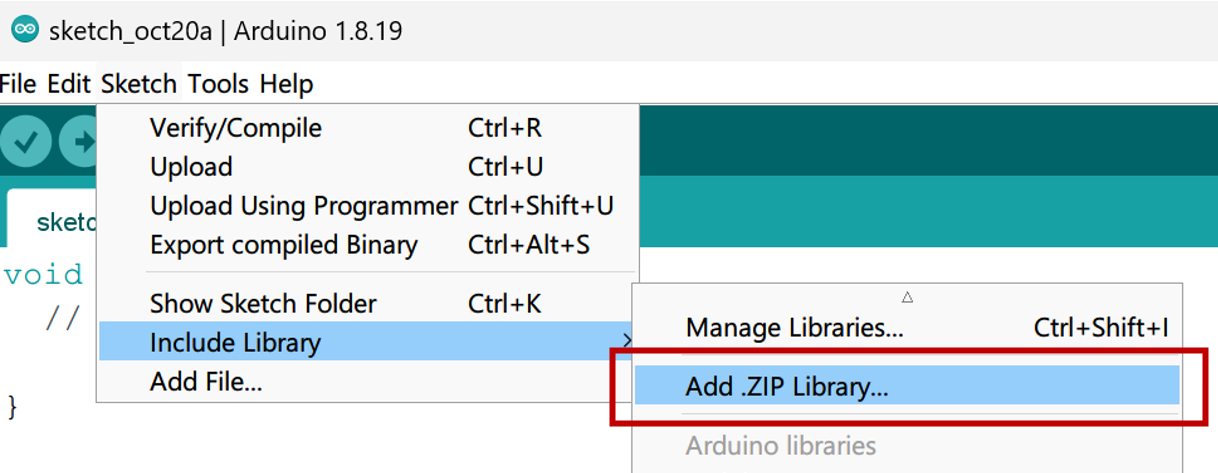
3. Install Processing Libraries:
- Download this repo HCI-Lab-Saarland/MultiTouchKitUI as a ZIP.
- Unzip and place the folder into Processing Libraries directory (these might differ depending on your installation, open Processing, on menu bar, Files > Preferences, check Sketchbook folder)
- Windows:
C:\Users\<USERNAME>\Documents\Processing\libraries - Mac:
~/Documents/Processing/Libraries
- Windows:
- Check the library folder name is MultiTouchKitUI.
- Unzip and place the folder into Processing Libraries directory (these might differ depending on your installation, open Processing, on menu bar, Files > Preferences, check Sketchbook folder)
- Open Processing, install more libraries:
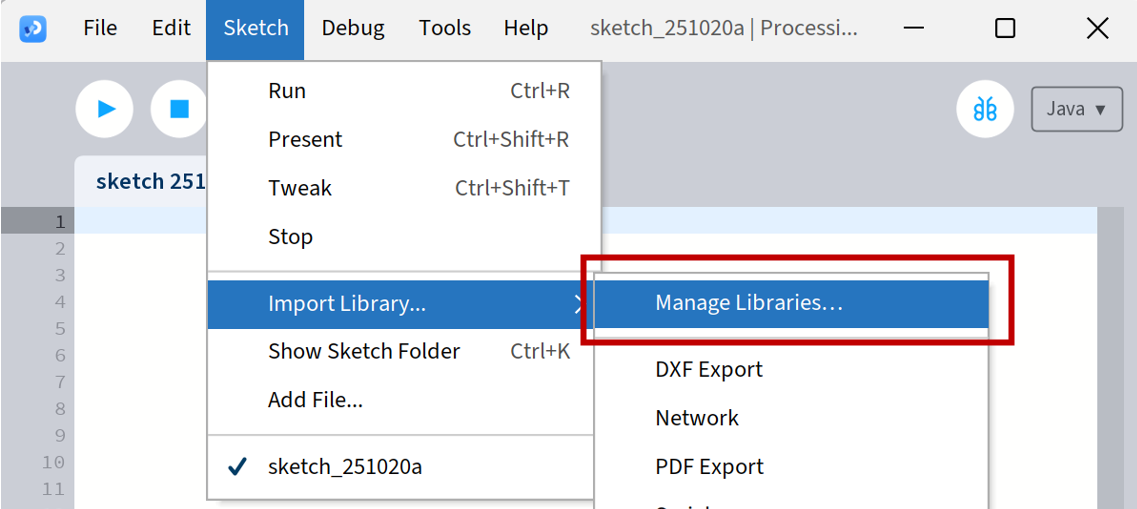
- Find the following libraries and install:
- BlobDetection
- OpenCV for Processing
Arduino Pro Micro
- Pro Micro & Fio V3 Hookup Guide - SparkFun Learn (HID examples)